This blog has moved to a new Address:- In-Face-Book.SJbn.Co. Please follow the link and update your bookmarks and all accordingly. Thanks...!!

Sunday, January 2, 2011

How To Block And Unblock Someone On Facebook

In Facebook many people want to block someone but don’t know how they can and ever there are people who have blocked someone in angry and now want to unblock them but don’t know how so here is a way how you can block and unblock anyone on Facebook.

How you can block someone
1.       Go to Facebook.com
2.       Login to your account
3.       Now go to the profile which you want to block
4.       Scroll down and in the left hand side column you will see written Report/Block This Person
5.       Click on it (Report/Block This Person)
6.       Now select Block this person box
7.       Then click on Submit button


Now that profile is block now that person with that profile can’t contact you through Facebook, can’t view your profile, it’s like for that profile your profile don’t exist anymore and also if you that persion is added in your friend list will get deleted. Same applies for you (who have blocked).Till you don’t remove it from block list.

Hope no one required to use this (How you can block someone) and hope who ever got block till now get unblock.

Here how you can remove someone from block list
1.       Go to Facebook.com
2.       Login to your account
3.       Now go to Account (top-right corner) --> Privacy Settings


4.       There at the middle-bottom of the page you will see written “Block Lists Edit your lists of blocked people and apps.”
5.       Click on Edit your lists
6.       Now search for the name you have blocked and want to unblock under Block users
7.       Beside that name you will see written Unblock click on it
8.       Then click on Conform button


Once you blocked someone that person get remove from your friend list so you have to resend the Add as Friends request. Hope now whoever is block now will get unblock.

Monday, December 27, 2010

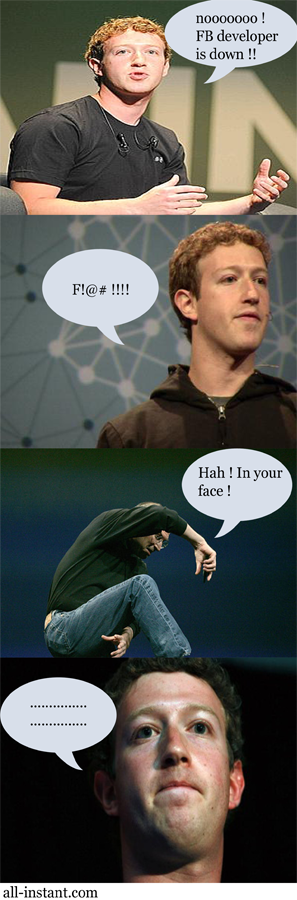
Facebook Developers Site Down [Comic]


via @xavier_eric

Facebook Developers Site Is Down

Facebook Developer Site Is Down. From near about an hour before I visited Facebook Developer get some code but when I visited Developer site error shows up This webpage is not available to get conform I searched in Twitter few people posted the site is down the 1st post was four hours back that means the site is down from near about four hours.

We will update when we will know more about it.


Update [6:16 PM (IST)] Facebook Developers site is up and working.

Facebook Data: What’s on your mind?


Wednesday, December 15, 2010

Facebook Asking To Update Your Security Information

Today I logged out from Facebook for some reason after few minutes when I re-login I show a massage saying Update Your Security Information with Overall Protection: Low. And asked me three things to do

1.       Contact Email:

2.       Mobile Phone:

3.       Security Question:

Monday, December 13, 2010

Coolest Facebook Profile Picture

Cross Post with Saket Jajodia

You must have show many type of profile picture on Facebook but I can tell this, this is the best one I have show till now. I have nothing to say much, just see and you tell us what you think


Image credit: Photojojo!


Image credit: Photojojo!


Image credit: xadacka


Thanks to AshuMittal for the tip


Now you say what do you think about it?

Friday, December 10, 2010

Should You Add Your Parents In Facebook Or Not?

Cross Post with Saket Jajodia

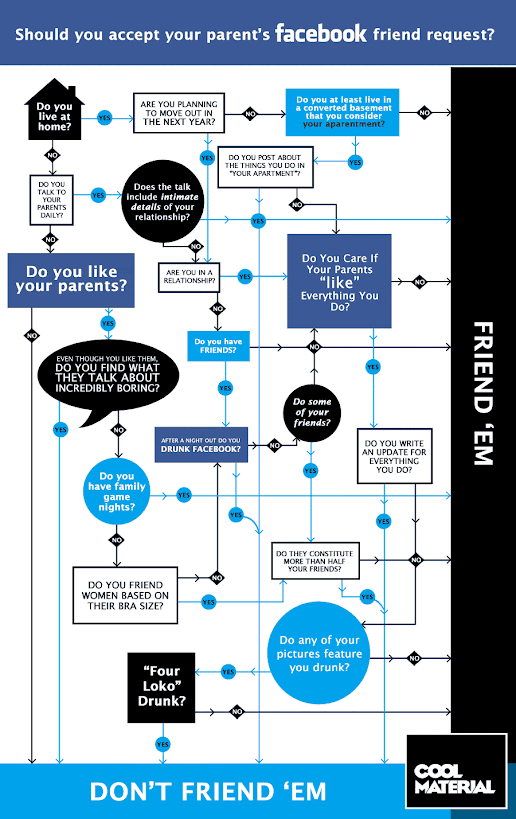
Have you added your parents as a friend in Facebook? If Yes then you should see the below flowchart what you should not do when you are friend with your parents in Facebook. And if No, and thinking about you should add them or not then for sure you should see below flowchart on “Should you accept your parent's facebook friend request?”


Now hope you got to know about should you accept your parent's Facebook friend request or not...

via TNW