This blog has moved to a new Address:- In-Face-Book.SJbn.Co. Please follow the link and update your bookmarks and all accordingly. Thanks...!!

Showing posts with label All. Show all posts

Wednesday, January 12, 2011

Facebook Started Showing Memorable Stories Of 2010 In Side Bar

Facebook have started showing old status in side bar. When you visit to see any photo in Facebook you will see your old statuses are appearing right side of that page with the heading of Memorable stories from 2010.


This is a quite good idea of remembering our old status but it can be a bad idea also there are some status which we don’t want to see again and it can remind our past which we don’t want to remember.

You can’t click on this status to go that old status page and make a comment or any such but you can remove any status which you don’t want it appear again and again under memorable stories.

However what is your favorite status from 2010, do tell us in the comment below.

Tuesday, January 11, 2011

Tata DOCOMO Celebrating One Million Facebook Fan By Giving Double Talktime

Tata Docomo has reached one millions Facebook fans so to celebrate it Tata have came up with an offer for all their Facebook fans. If you are one of them and using Tata DOCOMO number then you can also get double talktime.


Double talktime means if you recharge for Rs. 161 then you will get Talktime of Rs. 322. To get it
1.       Join the Tata DOCOMO Facebook page (if you are not)
2.       Then go to apps.facebook.com/amillionfans
3.       There they will ask you to allow access to your few Facebook information click on Allow button
4.       Then select your location (if your location is not there so can’t get this offer)
5.       Then give your Tata DOCOMO number
6.       Now click on Register button
7.       Now you will get a SMS on the number you have given
8.       Now go and recharge your Tata DOCOMO and get Double TalkTime

Note: - They have some Terms and Conditions for you all to follow
Here are few basic Terms and Conditions, to know all Click here
1.       The Offer is valid only in India
2.       The Offer shall run from the 11th January 2011 at 00.00 hrs and ending on 13th January 2011 at 23.59 hrs (hereinafter referred as "Offer Period").
3.       To participate in the Offer the participants must be a subscriber of Tata Docomo prepaid connection and must become a fan or follower of the official Tata DOCOMO Facebook page.
4.       Offer is applicable on all top up denominations starting from Rs 10 upto Rs 1000 only, per Tata Docomo prepaid number recharged by the Participant.
5.       Participants must recharge the Tata Docomo mobile number with the Top-up amount only through a valid retailer, channel partner, www.tatadocomo.com or distributor duly authorised by TTL.
6.       Participant shall be entitled for talktime twice of the top-up recharge made by the Participant during the Offer Period on fulfilment of following criteria:-
i)        Participant must be a fan or follower of the official Tata DOCOMO page on Facebook;
ii)       Participant does a top up recharge during the Offer Period;
iii)     Participant has a valid Tata Docomo prepaid mobile number;
iv)     Participant submits his Tata Docomo prepaid mobile number details along with the telecom circle to which his Tata Docomo prepaid mobile number belongs to accurately on the Facebook community page during the Offer Period.

Do share this with your friends, family and everyone else so they can also enjoy this offer.

And if you want us also to reach 1 million :P so do join our Facebook page and tell others also to join.

Here is few advertisement of Tata DOCOMO for all Tata DOCOMO fans

Tata DOCOMO - 'Best Operator in Emerging Markets'

If you are having problem in viewing the videos Click here.


3G Speed with Tata DOCOMO e-stick

If you are having problem in viewing the videos Click here.


Michael Jackson on Tata DOCOMO

If you are having problem in viewing the videos Click here.

Sunday, January 2, 2011

How To Block And Unblock Someone On Facebook

In Facebook many people want to block someone but don’t know how they can and ever there are people who have blocked someone in angry and now want to unblock them but don’t know how so here is a way how you can block and unblock anyone on Facebook.

How you can block someone
1.       Go to Facebook.com
2.       Login to your account
3.       Now go to the profile which you want to block
4.       Scroll down and in the left hand side column you will see written Report/Block This Person
5.       Click on it (Report/Block This Person)
6.       Now select Block this person box
7.       Then click on Submit button


Now that profile is block now that person with that profile can’t contact you through Facebook, can’t view your profile, it’s like for that profile your profile don’t exist anymore and also if you that persion is added in your friend list will get deleted. Same applies for you (who have blocked).Till you don’t remove it from block list.

Hope no one required to use this (How you can block someone) and hope who ever got block till now get unblock.

Here how you can remove someone from block list
1.       Go to Facebook.com
2.       Login to your account
3.       Now go to Account (top-right corner) --> Privacy Settings


4.       There at the middle-bottom of the page you will see written “Block Lists Edit your lists of blocked people and apps.”
5.       Click on Edit your lists
6.       Now search for the name you have blocked and want to unblock under Block users
7.       Beside that name you will see written Unblock click on it
8.       Then click on Conform button


Once you blocked someone that person get remove from your friend list so you have to resend the Add as Friends request. Hope now whoever is block now will get unblock.

Monday, December 27, 2010

Facebook Developers Site Down [Comic]


via @xavier_eric

Facebook Developers Site Is Down

Facebook Developer Site Is Down. From near about an hour before I visited Facebook Developer get some code but when I visited Developer site error shows up This webpage is not available to get conform I searched in Twitter few people posted the site is down the 1st post was four hours back that means the site is down from near about four hours.

We will update when we will know more about it.


Update [6:16 PM (IST)] Facebook Developers site is up and working.

Wednesday, December 15, 2010

Facebook Asking To Update Your Security Information

Today I logged out from Facebook for some reason after few minutes when I re-login I show a massage saying Update Your Security Information with Overall Protection: Low. And asked me three things to do

1.       Contact Email:

2.       Mobile Phone:

3.       Security Question:

Monday, December 13, 2010

Coolest Facebook Profile Picture

Cross Post with Saket Jajodia

You must have show many type of profile picture on Facebook but I can tell this, this is the best one I have show till now. I have nothing to say much, just see and you tell us what you think


Image credit: Photojojo!


Image credit: Photojojo!


Image credit: xadacka


Thanks to AshuMittal for the tip


Now you say what do you think about it?

Friday, December 10, 2010

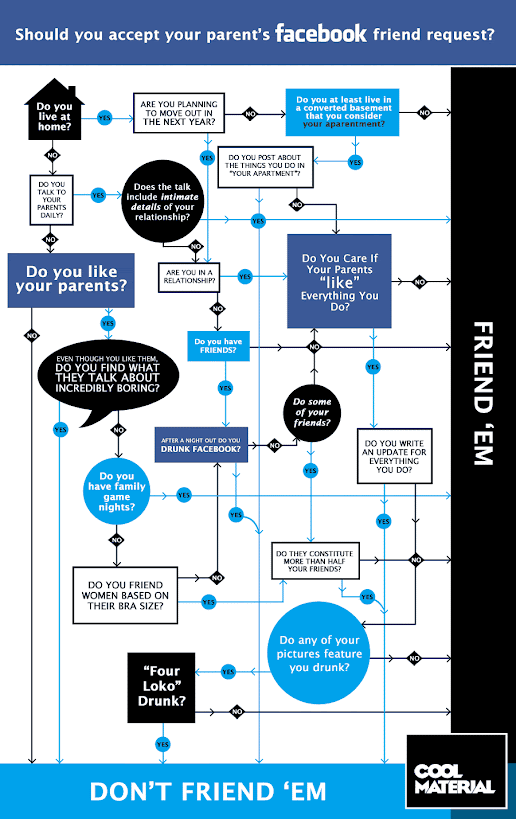
Should You Add Your Parents In Facebook Or Not?

Cross Post with Saket Jajodia

Have you added your parents as a friend in Facebook? If Yes then you should see the below flowchart what you should not do when you are friend with your parents in Facebook. And if No, and thinking about you should add them or not then for sure you should see below flowchart on “Should you accept your parent's facebook friend request?”


Now hope you got to know about should you accept your parent's Facebook friend request or not...

via TNW

Monday, December 6, 2010

Mark Zuckerberg and Facebook On “60 Minutes”

Yesterday evening Facebook CEO Mark Zuckerberg came to 60 Minutes show to talk about Facebook new profile layout, Privacy, The Social Network, Facebook HQ and etc.


Image Credit: 60 Minutes

You can watch out everything in below videos


A Tour of Facebook's Redesign


Mark Zuckerberg & Facebook, Part 1


Mark Zuckerberg & Facebook, Part 2


Friday, December 3, 2010

How To Get Your Facebook Account Disabled/Banned

A presentation by Massimo Burgio, in he told about how your Facebook account can get disable/banned by Facebook.

Here are some points he talked about
v  Not being real/fake name
v  Using copyrights martial
v  Promoting business
v  Adding to many friends/groups
v  Posting same thing many times
v  Spamming


Facebook Launched New Find Friend Browser

Facebook have bought new Find Friends Browser, which will help people to discover more of there existing friends on Facebook. It is more clean from the old one. You can filter people by there High School, College or University, Employer, Hometown, Current City and Mutual Friend.


People are probably ranked by Mutual Friends. And even the page load fast and as scroll down the list keep loading you don’t have to click on any button to load more people. And the one feature is not available as it was available in the previous version that you may not specify the class year of High School or Collage. If this feature would have in this version also then it would make it easier to find your existing friends on Facebook.

Let us know what you think about the new Find Friend Browser.

Thursday, December 2, 2010

SCAM: Facebook Revolving Images

Like always, one more SCAM have came to Facebook this time this SCAM will REVOLV FACEBOOK IMAGES (but like every SCAM this will also won’t). They will say you to Copy-Past a small code to your address bar in any Facebook page.  But YOU WILL NOT DO THAT.


If you are already got attacked from this SCAM and everyday a link get auto post on your wall without your permission then here is the solution
1.       Go to facebook.com/mobile/
2.       There you will find Find out more (see in image below) under Upload via Email Click on it
3.       A popup will open in search for refresh your upload email. (see in image below)
4.       Now click on it
5.       Now they will ask you to Reset it click on Reset button
6.       And you are done


Now you personalized upload email is changed


And here is a small list of links which belongs to this SCAM

http :/ / VODKASHOTS . TK/
http :/ / FERRARIHORSE . TK/
http :/ / GOLDENPIGEON . TK/
http :/ / SIMPLIFIEDTREASURE . TK/
http :/ / BEYONDBOUNDARIES . TK/
http :/ / WARMSHOULDER . TK/
http :/ / CURLINGROLLS . TK/
http :/ / FINGERFRIES . TK/
http :/ / CIRCULARMOTION . TK/
http :/ / bit . ly/faceb00ked
http :/ / MYHAMBURGER . TK/
http :/ / NOVEMBERRAIN . TK/
http :/ / CURLINGROLLS . TK/
http :/ / FINGERFRIES . TK/
http :/ / CIRCULARMOTION . TK/
http :/ / BEYONDBOUNDARIES . TK/
http :/ / CIRCLEINN . TK/
http :/ / VODKASHOTS . TK/
http :/ / FERRARIHORSE . TK/
http :/ / POLKADOTS . TK/
http :/ / revolvingimages . info/fb/
http :/ / PINKYFINGER . TK/
http :/ / STREETKID . TK/
http :/ / ANSWERINGPRAYERS . TK/
http :/ / GINGERBUDS . TK/
http :/ / SHORTONCHANGE . TK/
http :/ / bit . ly/91wrzd
http :/ / SPARKLINGSTARS . TK/
http :/ / LOVETRIANGLES . TK/
http :/ / SHADYCLOUDS . TK/
http :/ / RUGGEDJEANS . TK/
http :/ / kewlpics . tk/
http :/ / FLYBACK . TK/
http :/ / ABOUTCOFFEEBEANS . TK/
http :/ / REELLIFE . TK/
http :/ / WHITEDIAMONDS . TK/
http :/ / BEINGONE . TK/
http :/ / majicalimages . tk/
http :/ / FREEDOMPERSONIFIED . TK/
http :/ / OAKSHELTER . TK/
http :/ / MAPLELOVE . TK/
http :/ / FLOWERDESIGN . TK/http :/ / itsmajic . tk/
http :/ / MIXANDMATCH . TK/


Everyday a new link is been made so be very careful, maybe that link is not available in this list…

Friday, November 26, 2010

How To Download Your Data From Facebook

Cross Post with Saket Jajodia

Facebook recently added a new feature by which we can download our Facebook data in a zip file, in that zip file you will find your Profile Info, all your Wall posts, all your Photos which you have uploaded, all Videos that you have uploaded, name list of your Friends, Events which you have attended and private Messages you send/receive to/from your friends.


Here are the steps to download your Facebook data
1.       Go to facebook.com
2.       Login to your account
3.       Now select Account (top-right corner) --> Account Settings


4.       There you search for Download Your Information beside that you will see written learn more click on it
5.       Now at the bottom-left corner of the page you will Download button click on it


6.       Again they will ask you to click on Download button click on it


7.       Now you have to wait for a while they gather all your photos, wall posts, messages and other information. It might take hours, in my case it took near about two hours


8.       To check whether your download is ready or not follow the step 3 and 4, if your download is not ready the you will its written Pending…


9.       If your download is ready you will get an email (in registered email ID) or you can go to the page directly as I told in step 8 (to follow step 3 and 4)
10.   For secularity they will ask you to reenter your password


11.   Now click on Download Now button, you can see the file size below the button

Thursday, November 18, 2010

Request For Facebook New Messages Invitation

Cross Post with Saket Jajodia

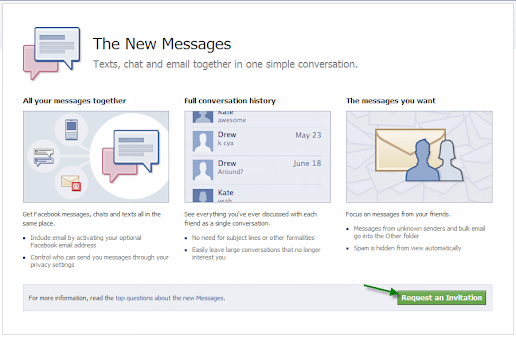
Facebook have announced about the new messaging service. There were rumors about it that it can be a Gmail, Yahoo mail killer. But as Mark Zuckerberg said it is not a Gmail, Yahoo mail killer. It brings all your massages, chat, mails all at one place.


But there is a sad news is that you won’t get access till you don’t get invited by your friends (if they have got access to it) or from Facebook itself. so if you want to get invited by Facebook soon so follow the following steps.

1.       Go to Facebook New Messages page(facebook.com/about/messages/)
2.       Then click on Request an Invitation button at the bottom-right corner of the page


3.       Now wait till Facebook sends you an invitation
4.       Or if any of your friends is using the New Facebook Messages then you can ask them to send you one.

When you get access to The New Messages let us know what you think about it.

Thursday, November 11, 2010

A Life On Facebook

A story of Alex Droner has been said using Facebook. Directed by Maxime Luère, according to Facebook he is working at Akama as a CG Lead Artist.


Wednesday, November 3, 2010

Facebook Mobile Event LIVE

Facebook Mobile Event (All About Places)


Watch It LIVE


Post Your Updates To Your Facebook Friends Using This Box


Sunday, October 31, 2010

Change Your Facebook Page Name

Cross Post with Saket Jajodia

This is the most requested feature to Facebook by the large number page administrator, now Facebook have finally allow page admin to change pages name.


To change the Facebook Page name
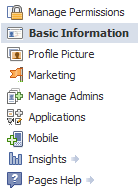
1.       Go to Edit Page (just below the display picture) option
2.       Now select Basic Information from the left side navigation


3.       Now you will see some option respective to your page type
4.       In that you will see the 1st option of Name
5.       Beside that you will see your current page name of which you want to change
6.       Now change that current page name with new name you want to give
7.       Click on Save Changes
8.       You’re done

Note: if you have more than hundred members in your page then you won’t be able to change the page name.

Saturday, October 30, 2010

See Spam Wall Of Other Pages

Facebook have rolled out a new Spam filtering feature which is only visible to admin of the page. But it is a bug or something else, don’t know but even non admin can also see the spam wall with a simple trick.


1.       Just go to the page of which you want to see the spam wall
2.       After going to the just add ?v=wall&filter=9 in the link
For e.g.: you want to see the spam wall of In-Face-Book then go to http://www.facebook.com/pages/In-Face-Book/107624809293409 not add ?v=wall&filter=9 like this http://www.facebook.com/pages/In-Face-Book/107624809293409?v=wall&filter=9

Now you will able to see the posts which are marked as spam in spam wall.

Facebook Added New Spam Filter Tab

Facebook have rolled out a great new feature for Page’s admin, especially for those pages which gets lots of Spam posts. This feature was in test from September and now Facebook have rolled out for all the users. They have added a Spam tab (only visible to admin) in Options.


This is what everyone (Admin) show on their pages when they gone to their page.


The posts by the followers likely to be seems as spam will get filtered in Spam tab, in case any post which didn’t caught by the Spam filter system then admin can send that post in Spam tab just by
1.       Hover over the post you want mark as spam
2.       You will see cross(X) at the corner of that post
3.       Click on that cross(X)
4.       Select Mark as Spam
Now it will go into spam tab


And in case Facebook or you (Admin) filtered any post which is not Spam can remove the it from Spam folder and make it visible to everyone just by
1.       Go to Spam tab
2.       Hover over the post you want remove from spam tab
3.       You will see cross(X) at the corner of that post
4.       Click on that cross(X)
5.       Select Unmark as Spam
Now it will get remove from Spam tab and will be visible in Just Other tab.


As Facebook made a feature for filter Spam posts but whats about the Spam Comments. However in pages we(Admin) can turn off the posts by followers but we(Admin) can't turn off the comments by followers, even in Facebook official page as they post anything on their page that post's comment get filled with spam links.

To know more about Spam filter option Click here.

Wednesday, October 13, 2010

Live From The Bing Facebook Event

Microsoft and Facebook announcement something big search.


Watch It LIVE


Post Your Updates To Your Facebook Friends Using This Box