This blog has moved to a new Address:- In-Face-Book.SJbn.Co. Please follow the link and update your bookmarks and all accordingly. Thanks...!!

Showing posts with label New Feature. Show all posts

Wednesday, January 12, 2011

Facebook Started Showing Memorable Stories Of 2010 In Side Bar

Facebook have started showing old status in side bar. When you visit to see any photo in Facebook you will see your old statuses are appearing right side of that page with the heading of Memorable stories from 2010.


This is a quite good idea of remembering our old status but it can be a bad idea also there are some status which we don’t want to see again and it can remind our past which we don’t want to remember.

You can’t click on this status to go that old status page and make a comment or any such but you can remove any status which you don’t want it appear again and again under memorable stories.

However what is your favorite status from 2010, do tell us in the comment below.

Monday, December 6, 2010

Mark Zuckerberg and Facebook On “60 Minutes”

Yesterday evening Facebook CEO Mark Zuckerberg came to 60 Minutes show to talk about Facebook new profile layout, Privacy, The Social Network, Facebook HQ and etc.


Image Credit: 60 Minutes

You can watch out everything in below videos


A Tour of Facebook's Redesign


Mark Zuckerberg & Facebook, Part 1


Mark Zuckerberg & Facebook, Part 2


Friday, December 3, 2010

Facebook Launched New Find Friend Browser

Facebook have bought new Find Friends Browser, which will help people to discover more of there existing friends on Facebook. It is more clean from the old one. You can filter people by there High School, College or University, Employer, Hometown, Current City and Mutual Friend.


People are probably ranked by Mutual Friends. And even the page load fast and as scroll down the list keep loading you don’t have to click on any button to load more people. And the one feature is not available as it was available in the previous version that you may not specify the class year of High School or Collage. If this feature would have in this version also then it would make it easier to find your existing friends on Facebook.

Let us know what you think about the new Find Friend Browser.

Thursday, November 18, 2010

Request For Facebook New Messages Invitation

Cross Post with Saket Jajodia

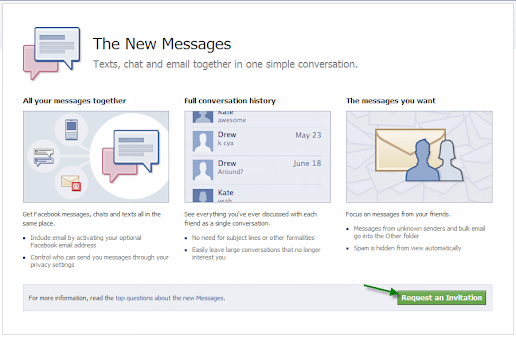
Facebook have announced about the new messaging service. There were rumors about it that it can be a Gmail, Yahoo mail killer. But as Mark Zuckerberg said it is not a Gmail, Yahoo mail killer. It brings all your massages, chat, mails all at one place.


But there is a sad news is that you won’t get access till you don’t get invited by your friends (if they have got access to it) or from Facebook itself. so if you want to get invited by Facebook soon so follow the following steps.

1.       Go to Facebook New Messages page(facebook.com/about/messages/)
2.       Then click on Request an Invitation button at the bottom-right corner of the page


3.       Now wait till Facebook sends you an invitation
4.       Or if any of your friends is using the New Facebook Messages then you can ask them to send you one.

When you get access to The New Messages let us know what you think about it.

Sunday, October 31, 2010

Change Your Facebook Page Name

Cross Post with Saket Jajodia

This is the most requested feature to Facebook by the large number page administrator, now Facebook have finally allow page admin to change pages name.


To change the Facebook Page name
1.       Go to Edit Page (just below the display picture) option
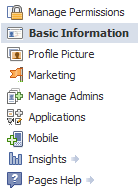
2.       Now select Basic Information from the left side navigation


3.       Now you will see some option respective to your page type
4.       In that you will see the 1st option of Name
5.       Beside that you will see your current page name of which you want to change
6.       Now change that current page name with new name you want to give
7.       Click on Save Changes
8.       You’re done

Note: if you have more than hundred members in your page then you won’t be able to change the page name.

Saturday, October 30, 2010

See Spam Wall Of Other Pages

Facebook have rolled out a new Spam filtering feature which is only visible to admin of the page. But it is a bug or something else, don’t know but even non admin can also see the spam wall with a simple trick.


1.       Just go to the page of which you want to see the spam wall
2.       After going to the just add ?v=wall&filter=9 in the link
For e.g.: you want to see the spam wall of In-Face-Book then go to http://www.facebook.com/pages/In-Face-Book/107624809293409 not add ?v=wall&filter=9 like this http://www.facebook.com/pages/In-Face-Book/107624809293409?v=wall&filter=9

Now you will able to see the posts which are marked as spam in spam wall.

Facebook Added New Spam Filter Tab

Facebook have rolled out a great new feature for Page’s admin, especially for those pages which gets lots of Spam posts. This feature was in test from September and now Facebook have rolled out for all the users. They have added a Spam tab (only visible to admin) in Options.


This is what everyone (Admin) show on their pages when they gone to their page.


The posts by the followers likely to be seems as spam will get filtered in Spam tab, in case any post which didn’t caught by the Spam filter system then admin can send that post in Spam tab just by
1.       Hover over the post you want mark as spam
2.       You will see cross(X) at the corner of that post
3.       Click on that cross(X)
4.       Select Mark as Spam
Now it will go into spam tab


And in case Facebook or you (Admin) filtered any post which is not Spam can remove the it from Spam folder and make it visible to everyone just by
1.       Go to Spam tab
2.       Hover over the post you want remove from spam tab
3.       You will see cross(X) at the corner of that post
4.       Click on that cross(X)
5.       Select Unmark as Spam
Now it will get remove from Spam tab and will be visible in Just Other tab.


As Facebook made a feature for filter Spam posts but whats about the Spam Comments. However in pages we(Admin) can turn off the posts by followers but we(Admin) can't turn off the comments by followers, even in Facebook official page as they post anything on their page that post's comment get filled with spam links.

To know more about Spam filter option Click here.

Wednesday, October 6, 2010

Facebook Going To Announce Something Big Today Watch It LIVE Here

Facebook is going to announce somthing big at Facebook HQ.


Watch It LIVE


Post Your Updates To Your Facebook Friends Using This Box


Tuesday, September 21, 2010

Facebook Bought New Way To Increase Members In Like Page

Now a day’s everyone wants their Facebook page have hundreds and thousands of members (fans). As from before there is an option to suggest to all your Facebook friends using Suggest to Friends option at the left column below profile image. But yesterday Facebook rolled out a new way to suggest to friends who is not in your friends list, you can suggest then by importing their E-mail IDs (for admin(s) only).


You can Import Contacts using Outlook, Mozilla Thunderbird, Palm Desktop, Entourage,
Mac OS X Address Book, LinkedIn and so on. You can also Import contacts login through Hotmail, Yahoo Mail, Gmail, etc.


And if your friend is not on Facebook it will send an e-mail to your friend to join Facebook and connect with your page.