A story of Alex Droner has been said using Facebook. Directed by Maxime Luère, according to Facebook he is working at Akama as a CG Lead Artist.

Thursday, November 11, 2010


Wednesday, November 3, 2010
Facebook Mobile Event LIVE
Facebook Mobile Event (All About Places)
Watch It LIVE
Post Your Updates To Your Facebook Friends Using This Box
Sunday, October 31, 2010
Change Your Facebook Page Name
Cross Post with Saket Jajodia

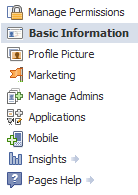
This is the most requested feature to Facebook by the large number page administrator, now Facebook have finally allow page admin to change pages name.
To change the Facebook Page name
1. Go to Edit Page (just below the display picture) option
2. Now select Basic Information from the left side navigation
3. Now you will see some option respective to your page type
4. In that you will see the 1st option of Name
5. Beside that you will see your current page name of which you want to change
6. Now change that current page name with new name you want to give
7. Click on Save Changes
8. You’re done
Note: if you have more than hundred members in your page then you won’t be able to change the page name.
Saturday, October 30, 2010
See Spam Wall Of Other Pages
Facebook have rolled out a new Spam filtering feature which is only visible to admin of the page. But it is a bug or something else, don’t know but even non admin can also see the spam wall with a simple trick.

1. Just go to the page of which you want to see the spam wall
2. After going to the just add ?v=wall&filter=9 in the link
For e.g.: you want to see the spam wall of In-Face-Book then go to http://www.facebook.com/pages/In-Face-Book/107624809293409 not add ?v=wall&filter=9 like this http://www.facebook.com/pages/In-Face-Book/107624809293409?v=wall&filter=9
Now you will able to see the posts which are marked as spam in spam wall.
Facebook Added New Spam Filter Tab
Facebook have rolled out a great new feature for Page’s admin, especially for those pages which gets lots of Spam posts. This feature was in test from September and now Facebook have rolled out for all the users. They have added a Spam tab (only visible to admin) in Options.


This is what everyone (Admin) show on their pages when they gone to their page.

The posts by the followers likely to be seems as spam will get filtered in Spam tab, in case any post which didn’t caught by the Spam filter system then admin can send that post in Spam tab just by
1. Hover over the post you want mark as spam
2. You will see cross(X) at the corner of that post
3. Click on that cross(X)
4. Select Mark as Spam
Now it will go into spam tab

And in case Facebook or you (Admin) filtered any post which is not Spam can remove the it from Spam folder and make it visible to everyone just by
1. Go to Spam tab
2. Hover over the post you want remove from spam tab
3. You will see cross(X) at the corner of that post
4. Click on that cross(X)
5. Select Unmark as Spam
Now it will get remove from Spam tab and will be visible in Just Other tab.

As Facebook made a feature for filter Spam posts but whats about the Spam Comments. However in pages we(Admin) can turn off the posts by followers but we(Admin) can't turn off the comments by followers, even in Facebook official page as they post anything on their page that post's comment get filled with spam links.
To know more about Spam filter option Click here.
Wednesday, October 13, 2010
Live From The Bing Facebook Event
Microsoft and Facebook announcement something big search.
Watch It LIVE
Post Your Updates To Your Facebook Friends Using This Box
Wednesday, October 6, 2010
Facebook Going To Announce Something Big Today Watch It LIVE Here
Facebook is going to announce somthing big at Facebook HQ.
Watch It LIVE
Post Your Updates To Your Facebook Friends Using This Box
Subscribe to:
Posts (Atom)