This blog has moved to a new Address:- In-Face-Book.SJbn.Co. Please follow the link and update your bookmarks and all accordingly. Thanks...!!

Monday, December 6, 2010

Mark Zuckerberg and Facebook On “60 Minutes”

Yesterday evening Facebook CEO Mark Zuckerberg came to 60 Minutes show to talk about Facebook new profile layout, Privacy, The Social Network, Facebook HQ and etc.


Image Credit: 60 Minutes

You can watch out everything in below videos


A Tour of Facebook's Redesign


Mark Zuckerberg & Facebook, Part 1


Mark Zuckerberg & Facebook, Part 2


Friday, December 3, 2010

How To Get Your Facebook Account Disabled/Banned

A presentation by Massimo Burgio, in he told about how your Facebook account can get disable/banned by Facebook.

Here are some points he talked about
v  Not being real/fake name
v  Using copyrights martial
v  Promoting business
v  Adding to many friends/groups
v  Posting same thing many times
v  Spamming


Facebook Launched New Find Friend Browser

Facebook have bought new Find Friends Browser, which will help people to discover more of there existing friends on Facebook. It is more clean from the old one. You can filter people by there High School, College or University, Employer, Hometown, Current City and Mutual Friend.


People are probably ranked by Mutual Friends. And even the page load fast and as scroll down the list keep loading you don’t have to click on any button to load more people. And the one feature is not available as it was available in the previous version that you may not specify the class year of High School or Collage. If this feature would have in this version also then it would make it easier to find your existing friends on Facebook.

Let us know what you think about the new Find Friend Browser.

Thursday, December 2, 2010

SCAM: Facebook Revolving Images

Like always, one more SCAM have came to Facebook this time this SCAM will REVOLV FACEBOOK IMAGES (but like every SCAM this will also won’t). They will say you to Copy-Past a small code to your address bar in any Facebook page.  But YOU WILL NOT DO THAT.


If you are already got attacked from this SCAM and everyday a link get auto post on your wall without your permission then here is the solution
1.       Go to facebook.com/mobile/
2.       There you will find Find out more (see in image below) under Upload via Email Click on it
3.       A popup will open in search for refresh your upload email. (see in image below)
4.       Now click on it
5.       Now they will ask you to Reset it click on Reset button
6.       And you are done


Now you personalized upload email is changed


And here is a small list of links which belongs to this SCAM

http :/ / VODKASHOTS . TK/
http :/ / FERRARIHORSE . TK/
http :/ / GOLDENPIGEON . TK/
http :/ / SIMPLIFIEDTREASURE . TK/
http :/ / BEYONDBOUNDARIES . TK/
http :/ / WARMSHOULDER . TK/
http :/ / CURLINGROLLS . TK/
http :/ / FINGERFRIES . TK/
http :/ / CIRCULARMOTION . TK/
http :/ / bit . ly/faceb00ked
http :/ / MYHAMBURGER . TK/
http :/ / NOVEMBERRAIN . TK/
http :/ / CURLINGROLLS . TK/
http :/ / FINGERFRIES . TK/
http :/ / CIRCULARMOTION . TK/
http :/ / BEYONDBOUNDARIES . TK/
http :/ / CIRCLEINN . TK/
http :/ / VODKASHOTS . TK/
http :/ / FERRARIHORSE . TK/
http :/ / POLKADOTS . TK/
http :/ / revolvingimages . info/fb/
http :/ / PINKYFINGER . TK/
http :/ / STREETKID . TK/
http :/ / ANSWERINGPRAYERS . TK/
http :/ / GINGERBUDS . TK/
http :/ / SHORTONCHANGE . TK/
http :/ / bit . ly/91wrzd
http :/ / SPARKLINGSTARS . TK/
http :/ / LOVETRIANGLES . TK/
http :/ / SHADYCLOUDS . TK/
http :/ / RUGGEDJEANS . TK/
http :/ / kewlpics . tk/
http :/ / FLYBACK . TK/
http :/ / ABOUTCOFFEEBEANS . TK/
http :/ / REELLIFE . TK/
http :/ / WHITEDIAMONDS . TK/
http :/ / BEINGONE . TK/
http :/ / majicalimages . tk/
http :/ / FREEDOMPERSONIFIED . TK/
http :/ / OAKSHELTER . TK/
http :/ / MAPLELOVE . TK/
http :/ / FLOWERDESIGN . TK/http :/ / itsmajic . tk/
http :/ / MIXANDMATCH . TK/


Everyday a new link is been made so be very careful, maybe that link is not available in this list…

Friday, November 26, 2010

How To Download Your Data From Facebook

Cross Post with Saket Jajodia

Facebook recently added a new feature by which we can download our Facebook data in a zip file, in that zip file you will find your Profile Info, all your Wall posts, all your Photos which you have uploaded, all Videos that you have uploaded, name list of your Friends, Events which you have attended and private Messages you send/receive to/from your friends.


Here are the steps to download your Facebook data
1.       Go to facebook.com
2.       Login to your account
3.       Now select Account (top-right corner) --> Account Settings


4.       There you search for Download Your Information beside that you will see written learn more click on it
5.       Now at the bottom-left corner of the page you will Download button click on it


6.       Again they will ask you to click on Download button click on it


7.       Now you have to wait for a while they gather all your photos, wall posts, messages and other information. It might take hours, in my case it took near about two hours


8.       To check whether your download is ready or not follow the step 3 and 4, if your download is not ready the you will its written Pending…


9.       If your download is ready you will get an email (in registered email ID) or you can go to the page directly as I told in step 8 (to follow step 3 and 4)
10.   For secularity they will ask you to reenter your password


11.   Now click on Download Now button, you can see the file size below the button

Thursday, November 18, 2010

Request For Facebook New Messages Invitation

Cross Post with Saket Jajodia

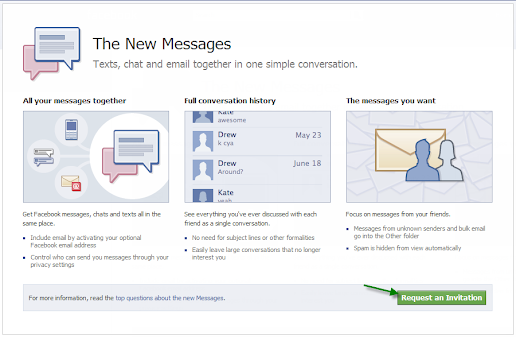
Facebook have announced about the new messaging service. There were rumors about it that it can be a Gmail, Yahoo mail killer. But as Mark Zuckerberg said it is not a Gmail, Yahoo mail killer. It brings all your massages, chat, mails all at one place.


But there is a sad news is that you won’t get access till you don’t get invited by your friends (if they have got access to it) or from Facebook itself. so if you want to get invited by Facebook soon so follow the following steps.

1.       Go to Facebook New Messages page(facebook.com/about/messages/)
2.       Then click on Request an Invitation button at the bottom-right corner of the page


3.       Now wait till Facebook sends you an invitation
4.       Or if any of your friends is using the New Facebook Messages then you can ask them to send you one.

When you get access to The New Messages let us know what you think about it.

Monday, November 15, 2010

Facebook Messaging Event LIVE From St. Regis Hotel In San Francisco

Facebook Messaging Event (The rumor on email product since Friday.)


Watch It LIVE


Post Your Updates To Your Facebook Friends Using This Box